


ArgoVPN
4.23.03K Reviews
App Specs
- Version
- 3.0.18
- Updated On
- License
- Free
- Downloads
- 10,000,000+
- Developer
- Filtershekanha
- Categories
- Tools
- Platform
- Android
Screenshots
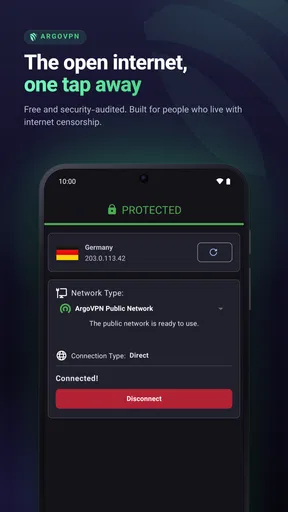
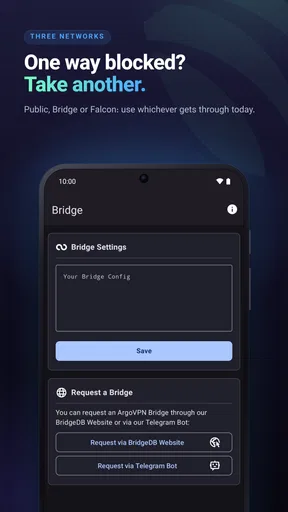
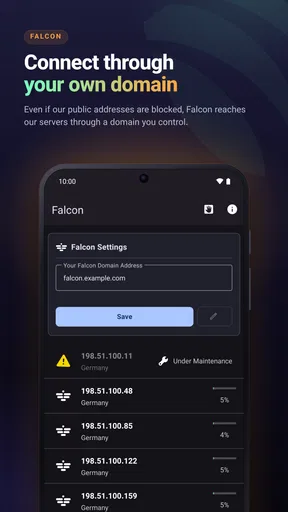
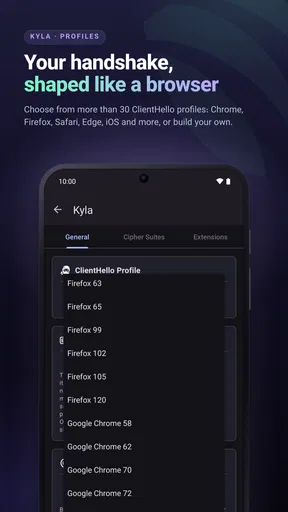
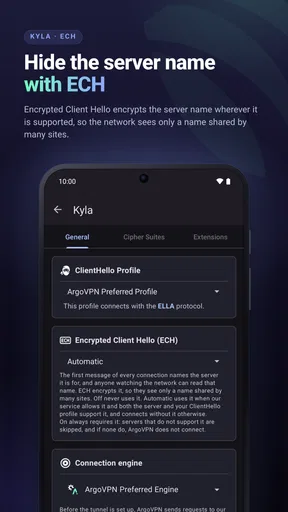
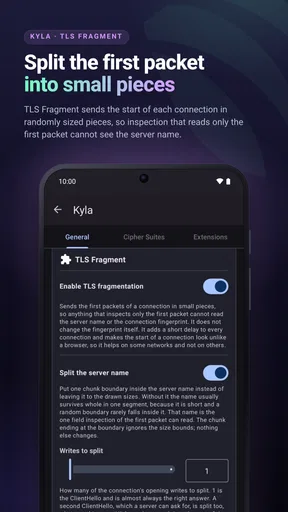
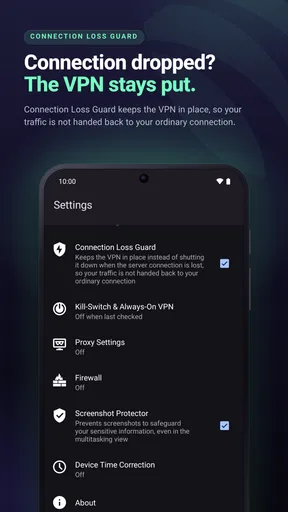
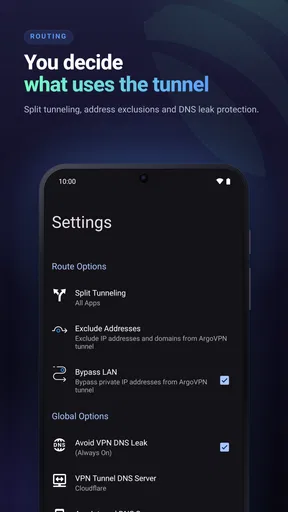
 Analysis by AppCompare
I approach VPN apps with one practical question: will I still know what to do when a connection does not work as expected? A simple connect button is useful, but the moments around it matter too: choosing whether to route an app through the tunnel, deciding when to try again, and recognizing when the trouble is actually coming from the network. That is the lens I use for ArgoVPN, a free tools app from Filtershekanha. It is rated for Everyone, and its appeal is clearest for people who want an uncomplicated way to change their IP address without first learning a long list of technical settings.
When a quick connection turns into a small puzzle
The first point of friction with any VPN is often not installation but uncertainty: the app appears to connect, yet a page or service still behaves differently than expected. I would avoid treating one stalled page as proof that the whole connection has failed. A site can take longer to load through a VPN, and an app may need to be closed and reopened before it recognizes a changed network route. Checking a second ordinary webpage is a more useful first test than repeatedly tapping connect.
It also helps to separate two goals that people sometimes mix together. A VPN can change the route your traffic takes and the IP address visible to services, but it is not a guarantee that every app or website will behave as though you are somewhere else. Services can use account settings, device information, or their own access rules. I would use ArgoVPN for a practical privacy layer or a different network route, not assume that it can make every region-restricted service work.
Small checks before you start troubleshooting
Before connecting, I make sure the phone itself has a working internet connection. If a page will not load with the VPN off, the VPN is unlikely to be the main cause. I also check whether I am switching between Wi-Fi and mobile data at that moment; changing networks during a connection can make the result confusing. A cleaner test is to stay on one network, connect, and then try the same page again.
For a first session, I would keep the workflow deliberately simple: open the app, connect, wait for the connection state to settle, and test a familiar site. That gives me a baseline before I adjust anything. If I later use the app’s Falcon option, I would change one app’s routing at a time and test it rather than altering several choices together. It is easier to work out what changed when there is only one variable.
Getting Started with ArgoVPN
First things first, installing ArgoVPN is a breeze. Available on both Android and iOS, I found it on the app store with a quick search and installed it in no time. Once you open it up, the interface is clean and user-friendly — no clutter, just straightforward options to get you connected. I’m all for simplicity, so this was a big win in my book.
The app doesn’t bombard you with too many settings at the start, which is perfect if you’re not a tech wizard. You just hit the connect button, and boom, you’re good to go. The app uses secure protocols to ensure your internet traffic is safe from prying eyes. I felt an immediate sense of relief knowing my online activities were shielded.
Worth Reading Before You Choose

Flipboard Shows What News Apps Must Do Beyond the Feed

Switching to Android Auto Means Rethinking Your Driving Routine

Google Calendar Makes a Crowded Week Easier to Manage

Ludo King Makes the Most of the Minutes Between Plans

Baby Panda World Brings Quick Play to Modern Phones, but Its Game Library Feels Busy

ESPN’s Live Game View Makes Following Close Games Easier
Diving Deeper into Features
Now, let’s talk features. ArgoVPN has a nifty little option called Falcon. This feature allows you to select specific apps to bypass the VPN, which is awesome if you want to keep some apps connected locally. It’s like having your cake and eating it too. I used it to keep my banking app out of the VPN’s reach, just for peace of mind.
That selective routing is most useful when a task depends on a familiar local connection. For example, if a banking app behaves oddly while the VPN is on, excluding only that app can be less disruptive than disconnecting the VPN for everything else. I would still make the choice deliberately: the excluded app no longer benefits from the VPN route. For an app where privacy is the priority, leaving it outside the tunnel would defeat the point.
A good way to avoid confusion is to keep a short mental note of which apps you have excluded and why. If something later stops working, revisit that choice before changing several settings at once. The trade-off is convenience versus coverage: Falcon can make selected apps behave more normally on a local network, but each exception creates a route that differs from the rest of the phone.
Another cool feature is the ability to choose from multiple servers. Although the selection isn’t as vast as some big-name VPNs, I found the servers to be stable and fast. Streaming Netflix from another country? No problem. I was able to binge-watch shows without any annoying buffering.
For everyday use, I would choose a server based on the task rather than keep switching just to chase a theoretical speed improvement. A nearby option is generally a sensible starting point when the aim is responsive browsing; if a particular site is the reason for using a different route, test that site after connecting and give the session a moment to settle. If one server is sluggish, trying another is a reasonable next step, but changing servers repeatedly can make it harder to tell whether the issue is the route, the service, or the underlying connection.
It is also worth keeping expectations realistic with streaming. A VPN connection does not control a streaming service’s catalogue, account rules, or ability to recognize a VPN route. In my view, the useful question is not whether a VPN promises access to a particular show, but whether the connection stays usable for the things I normally do. Someone whose main requirement is reliable access to a specific regional library may be better served by a service that clearly supports that use case.
Security is a big deal, and ArgoVPN doesn’t skimp on this front. With encrypted tunnels and a strict no-logs policy, I felt confident that my data was in safe hands. Plus, the app offers DNS leak protection and a kill switch feature, which cuts your internet if the VPN connection drops. It’s like having a safety net, ensuring you’re never exposed.
Those safeguards are most valuable when I am using a network I do not control, but they are not a reason to ignore basic habits. I would still use secure sign-in practices and avoid entering sensitive details on a page that looks suspicious. A VPN can protect the route; it cannot tell me whether a message, download, or website is trustworthy. The practical benefit is an extra layer, not a replacement for judgment.
Performance and Usability
Alright, let’s get real about performance. I’ve tried a few VPNs in my time, and speed can be a dealbreaker. Fortunately, ArgoVPN didn’t disappoint. I tested it on various networks — from my home Wi-Fi to a crowded coffee shop — and the speeds were consistently impressive. Streaming, browsing, and even gaming felt seamless, which is a huge plus for a VPN.
My everyday test would be less dramatic: connect before checking messages or browsing while waiting for a coffee, then see whether the sites I need remain responsive. If a video pauses or a game feels delayed, I would first compare the same activity with the VPN disconnected, rather than immediately assume the app is malfunctioning. A VPN adds another step between the phone and the service, so some slowdown or extra latency can happen even when the connection is working normally.
That distinction matters most for real-time activities. For reading, ordinary browsing, and routine app use, a small delay may not matter. For a fast online game, a video call, or a task that depends on the lowest possible latency, I may prefer my direct connection. A VPN is not automatically the best route for every moment; the right choice depends on whether privacy or responsiveness matters more for that particular task.
The app doesn’t drain your battery either. I was concerned about keeping it running in the background, but my phone’s battery life remained pretty steady. That’s a relief, especially when you’re out and about without a charger in sight.
If a connection seems to stop working mid-session, I would recover in stages instead of changing everything at once: check that the phone still has internet access, disconnect and reconnect, then test a different server if the problem remains. If the issue affects only one app, Falcon’s routing choice is worth checking. If all apps struggle both with and without the VPN, restarting the phone or reconnecting to the Wi-Fi may be more useful than repeatedly adjusting the VPN.
When the network, not the VPN, is the problem
A captive Wi-Fi network, such as one that asks you to accept terms or sign in through a browser page, can complicate the first connection. I would complete that network’s sign-in step before relying on the VPN, then reconnect and test again. The same logic applies to a weak mobile signal: switching VPN servers cannot repair a connection that is already dropping at the phone’s end.
There is also a useful diagnostic split between one failing service and a general failure. If a single site refuses to load while other browsing works, the service itself or its policies may be responsible. If nothing loads after connecting but everything works directly, restarting the VPN session and testing another server are reasonable checks. If nothing works either way, I would look to the phone’s internet connection first. This simple sequence avoids blaming the app for problems it cannot fix.
ArgoVPN is a better fit for someone who wants a quick, accessible tool than for someone who wants to tune every detail of a VPN connection. The interface’s lack of a heavy settings burden is a strength for casual use, but people who need extensive server choice, fine-grained controls, or a particular documented privacy setup should compare specialist alternatives carefully. A more configurable service can be the better choice when those requirements matter more than simplicity.
Who will get the most from it
I can see this app fitting a commuter who uses public Wi-Fi for routine browsing, or someone who wants a straightforward way to change their IP address without managing a complicated setup. A realistic day might mean connecting before reading news at a café, leaving a banking app outside the VPN if it works better locally, and disconnecting later when a low-latency task matters more. That is a modest, practical workflow rather than a promise that every online activity will improve.
It is less suited to a person who expects a VPN to guarantee anonymity, defeat every content restriction, or solve a poor internet connection. I would also suggest looking elsewhere if the deciding factor is a very large server network or detailed control over routing. ArgoVPN’s ease of entry is appealing, but ease should not be mistaken for a fit with every specialist need.
The app has been available since July 17, 2020, and its current version is 3.0.18. It works on Android 5.0 and later; on the store, it has an average rating of 4.2 from around 81,000 ratings, with roughly 3,000 written reviews and more than 10 million installs. Those figures suggest a sizeable audience, but I would still judge it by whether its straightforward connection and app-routing options suit my own routine.
Final Thoughts
So, would I recommend ArgoVPN? Absolutely. It’s a solid choice for anyone looking to enhance their online privacy without jumping through hoops. Whether you’re a seasoned VPN user or a complete newbie, the app’s intuitive design and robust features make it an appealing option.
Sure, it might not have the extensive server list of some competitors, but what it lacks in quantity, it makes up for in quality. Fast connections, strong security features, and a free price tag? Sign me up! Plus, the added flexibility with features like Falcon makes it a standout option.
In a world where online privacy is more important than ever, ArgoVPN offers a straightforward and effective solution. So go ahead, give it a whirl and surf the web with peace of mind!
Pros
- User-friendly interface with intuitive design.
- Offers multiple server locations for privacy.
- Includes a built-in firewall for added security.
- Free to use with no hidden costs or ads.
- Supports bypassing geo-restrictions effectively.
Cons
- Limited server options compared to premium VPNs.
- Occasional connection drops in high traffic.
- May slow down internet speed slightly.
- No dedicated customer support available.
- Lacks advanced features for power users.
FAQs for ArgoVPN
What is ArgoVPN and how does it work?
ArgoVPN is a free, user-friendly VPN service designed to provide secure and private internet access. It encrypts your internet connection, safeguarding your data from hackers and unauthorized access. By routing your traffic through a secure server, ArgoVPN masks your IP address, allowing you to browse anonymously and access geo-restricted content.
Is ArgoVPN safe to use for protecting my privacy online?
Yes, ArgoVPN is designed with privacy and security as top priorities. It employs strong encryption protocols to protect your data from potential threats. Additionally, ArgoVPN does not log your browsing activity, ensuring your online actions remain private. However, always verify their privacy policy for the latest updates.
How can I download and install ArgoVPN on my device?
To download ArgoVPN, visit the official website or the app store on your Android or iOS device. Search for ArgoVPN and select the download option. Once downloaded, follow the on-screen instructions to install the app. Make sure to grant necessary permissions for optimal functionality.
Does ArgoVPN offer any additional features beyond basic VPN functionality?
Yes, ArgoVPN includes features like a built-in firewall to block unwanted traffic and a feature called Falcon for faster connection speeds. It also offers the ability to customize DNS settings and provides a split tunneling option, allowing you to choose which apps use the VPN connection.
Are there any limitations or drawbacks to using ArgoVPN?
While ArgoVPN offers many benefits, it may not provide the same speed or server variety as paid VPNs. Some users might experience slower connections during peak times. Additionally, as a free service, it might lack advanced features like dedicated servers for streaming or torrenting.


